



What Is a UPS and Why You Need One
An Uninterruptible Power Supply (UPS) is a very important power-protective device that is placed between the utility grid and your electronic equipment. This specialized power source ensures that your ac power remains stable. The fundamental components are an inverter circuit and an energy storage battery. A UPS can also switch to power backup in a few milliseconds when the grid goes dead, or when the voltage is unstable, like during surges or brownouts, to keep electronic devices connected to it supplied with continuous power.
The value of a UPS manifests itself in three forms in the digital and industrial world today. First, it eliminates hardware damage: electronic components are highly sensitive to the quality of power, and power fluctuations may reduce the life of equipment. Second, it eliminates the data loss caused by a sudden power loss by allowing servers and computers sufficient time to save work and close down safely. Most importantly, it safeguards business continuity. In the case of hospitals, data centers, or industrial automation lines, a power failure or a one-second power flicker can cause production halts. A UPS provides essential outage protection, serving as a life insurance policy for a modern operation.
The Three Main Technical Types of UPS Systems
In selecting a type of ups, it is important to know the internal operation of each architecture. Although all different types of ups systems have the same objective of uninterruptible power, the technology employed to accomplish the objective creates significant variations in the level of protection, voltage stability, and purity of power. In the commercial and industrial markets, the three most popular different types of ups are Offline/Standby, Line-Interactive, and Online Double Conversion.
Offline/Standby UPS: The Basic Gatekeeper of Protection
The simplest in structure and the cheapest are offline ups units. In normal operation, a transfer switch is used to pass incoming ac power from the main supply to the load, and an internal charger is used to convert AC to direct current to keep the battery charged. The UPS primarily offers basic surge suppression in this state.
How it works: It is all about the word standby. The inverter will only begin converting the DC power in the battery into AC to power the load when the input voltage falls below a predetermined threshold- or the power is completely lost.
Transfer time: Since switching is based on a physical transfer mechanism, a short interruption of 5-10 milliseconds tends to occur. This delay can be tolerated by most home PCs, monitors and devices with switching power supplies without shutting down.
Pros & cons: Standby UPS units are small, very efficient (low loss when power is passed through) and economical. The tradeoff is low protection: they do not cope with high frequency variation in voltage, and their output is not always real sine, but simulated sine.
Line-Interactive UPS: The Sweet Spot of Efficiency and Voltage Regulation
One of the most popular systems in offices is the line-interactive model. These interactive ups systems extend the standby design by incorporating an Automatic Voltage Regulator (AVR) to stabilize incoming power in real time.
How it works: Utility power is fed into the UPS, and the AVR increases or reduces voltage depending on the signal detected by the UPS. That is to say that when the grid is a little high or low, the UPS adjusts it without necessarily drawing on the battery. The inverter only comes into play in the event of a complete outage.
Technical advantage: It is capable of operating under small-to-moderate fluctuation without shutdown and has a much longer battery life due to less unnecessary charge/discharge cycles.
Best for: Gaming PCs, small servers, NAS storage, network switches, particularly where the voltage is not constant. Transfer time is normally 2-6 milliseconds and power quality is usually cleaner compared to standby designs.
Online Double Conversion UPS: The Ultimate Defense for Precision Loads
An online ups system is regarded as the gold standard of protection. The online ups is constantly changing power in two steps, AC to DC and DC to AC, providing total power conditioning to isolate the load from utility disturbances.
How it works: Whether the grid is healthy or not, the load is always powered by the inverter. Utility AC is first rectified into DC; part charges the battery while the rest feeds the inverter, which reconstructs a near-perfect AC output.
Zero transfer time (0 ms): Because the inverter is always online, when the grid fails the DC bus is immediately supplied by the battery—so the output sees no interruption.
Why professionals rely on it: This topology eliminates virtually all grid noise—voltage spikes, frequency drift, harmonic distortion, and more. In the case of industrial precision equipment, operating room devices, and large data centers, this is the only architecture that is actually worthy of the term fail-safe.
Efficiency note: Double conversion typically incurs around ~10% conversion loss, but the payoff is pure sine wave output and maximum protection for high-value assets.
Technical Feature Comparison Table
| Feature | Offline/Standby | Line-Interactive | Online Double Conversion |
| Transfer Time | 5–10 ms | 2–6 ms | 0 ms (seamless) |
| Voltage Regulation (AVR) | No (battery only) | Yes (multi-step regulation) | Extremely high (rebuilds voltage continuously) |
| Output Waveform | Simulated / square | Simulated or pure sine | Pure sine wave |
| Battery Wear | Higher (more frequent switching) | Lower (AVR reduces cycling) | Lowest (battery acts as energy reservoir) |
| Efficiency | 95–98% | 90–96% | 85–92% |
| Best For | Routers, non-critical loads | Workstations, switches | Industrial PLCs, medical, core servers |
Understanding the Key Differences in Waveform Output
When you delve into UPS specifications, the detail that is ignored by casual buyers is waveform output, yet that is a make-or-buy parameter to the experienced engineer. The quality of waveforms has a direct effect on equipment stability and life. UPS output waveforms are currently divided into two broad categories in the market: Pure Sine Wave and Simulated/Modified Sine Wave.
Pure Sine Wave: Utility-Grade Power, Cleaner Than the Grid
The perfect type of AC electricity is pure sine wave power. The voltage curve is smooth, continuous and sinusoidal- such as that offered by the utility (and usually cleaner due to internal filtering).
Why it matters: Modern precision electronics—especially devices with Active Power Factor Correction (Active PFC) power supplies, such as servers, high-end gaming systems, and medical imaging equipment—can be extremely demanding about waveform quality.
Benefits: Pure sine wave output saves heat, is more efficient, and eliminates such problems as audio hum or video noise due to dirty power.
Simulated Sine Wave: A Budget Compromise
Simulated (modified) sine wave UPS units are approximations of a sine curve by a series of step-like voltage transitions. They are capable of sustaining simple electronics, and the result is essentially discontinuous.
Hidden risks: That “stair-stepped” current can introduce extra harmonic heating in sensitive devices. Over time it may cause inductive components to buzz, or even trigger thermal/overload protection in high-end PSUs—resulting in unexpected shutdowns.
Hard limitations: Modified sine wave output should not be used for fluorescent ballasts, dimmers, or loads with AC motors (fans, pumps, many industrial devices), where it can reduce performance or cause damage.
Practical selection guidance
Pure sine wave is the only sensible option in case of enterprise and mission-critical systems. Although it is more expensive in the short term, it is much cheaper than hardware failure, downtime in production, or power-incompatibility accidents. In industrial automation, sensor accuracy and controller stability are based on smooth and stable output, and one reason serious users will want suppliers with strong technical credibility in power components.
Matching UPS Types to Your Specific Use Case
The selection of a UPS should not be a hasty buy of the more expensive is better type but rather an exact fit of the load needs and the level of protection. The various use cases have different power pain points, and therefore the logic of selection should be application specific.
Home Entertainment and Basic Office Use
In this case, the most common problems are typically short-term failures that disconnect the router (and your internet) or turn off a TV. An Offline/Standby UPS is the most economical option because these devices consume less power and can withstand a certain amount of variation. It gives a couple of minutes of buffer-time–time to save work or ride through temporary inconveniences.
High-End Gaming PCs and Creative Workstations
The contemporary rigs tend to incorporate costly GPUs and Active PFC power supplies. Inexpensive imitated sine wave UPS devices can lead to PSU alarm, buzzing, or even forced re-boots. The closest one is a Line-Interactive UPS with pure sine wave output. It regulates voltage swings and, with AVR, shields your equipment without draining the battery with the constant on-off cycling.
Business Servers and Core Network Rooms
When you can not afford even a second of downtime, an Online Double Conversion UPS is the norm. True 24/7 uptime is based on zero transfer time and continuously conditioned power.
Industrial Automation and Harsh Production Environments
UPS selection logic is fundamentally different in factories, production lines, and outdoor control cabinets. Common commercial UPS systems are usually not able to cope with hot weather, dust and electromagnetic interference.
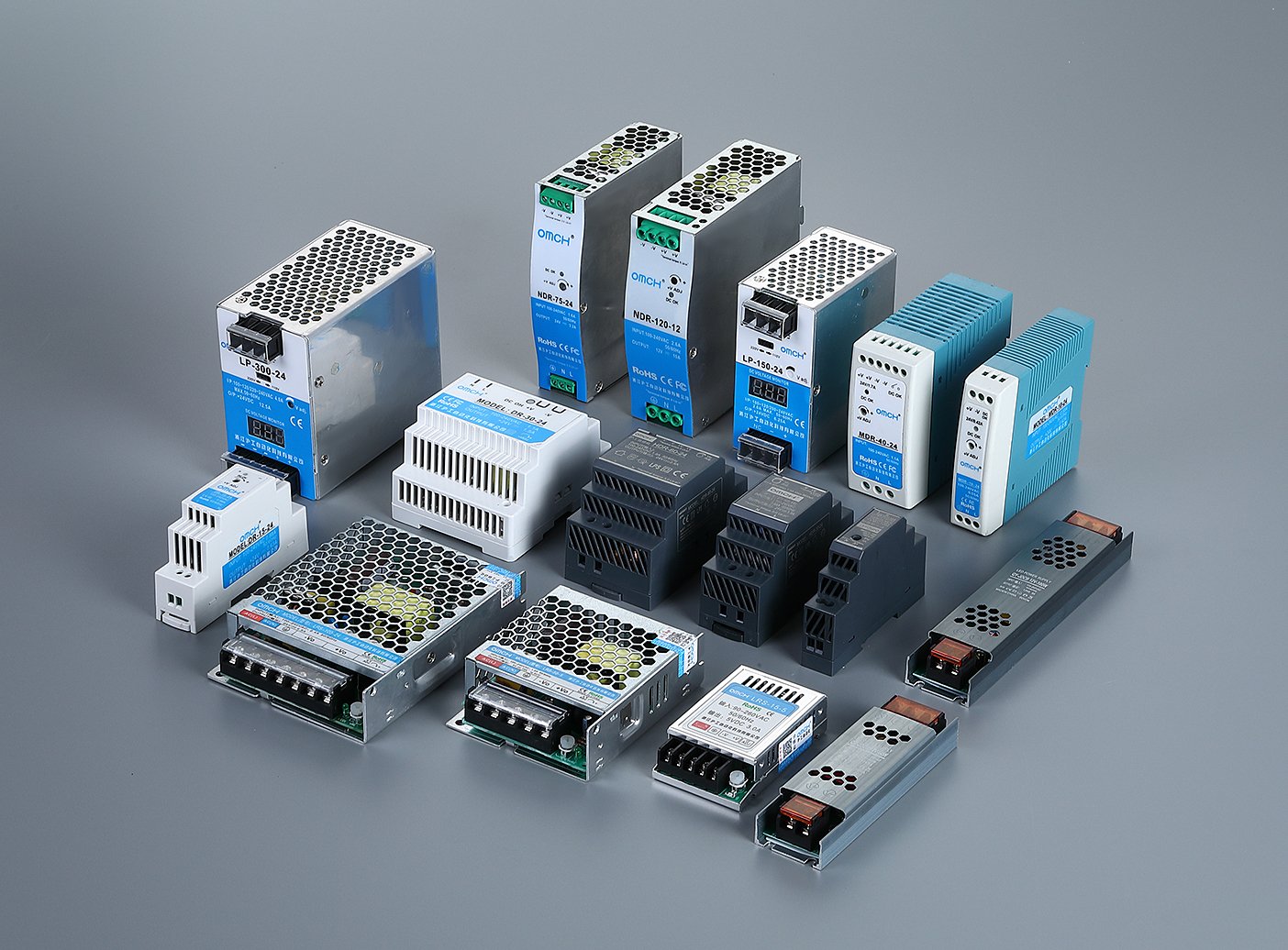
This is where OMCH comes in with actual value. OMCH has almost 40 years of profound experience in industrial automation (since 1986), so it knows the significance of UPS, as well as provides the supporting solutions, such as industrial-grade switching power supplies and DIN-rail power supplies tailored to control-cabinet realities.
- Industrial-grade quality assurance: Compared with consumer-grade products, OMCH power solutions meet rigorous certifications such as IEC standards, CE, RoHS, and ISO9001, ensuring high conversion efficiency and strong anti-interference performance—so PLCs and sensors receive stable DC power even in noisy environments.
- One-stop system synergy: Industrial projects face complex selection challenges. OMCH offers 3,000+ SKUs, spanning from miniature circuit breakers (MCB) at the distribution end to sensors and connectors at the field end. This full-coverage ecosystem helps engineers configure an entire cabinet in one procurement flow—ensuring electrical compatibility between the UPS and downstream power modules.
- Global service readiness: With sales and service coverage in 100+ countries and experience serving 72,000+ customers, OMCH is positioned for fast, around-the-clock response—helping protect critical equipment beyond consumer-grade standards wherever you operate.
Calculating the Battery Capacity and Runtime Requirements
After selecting the UPS type, the next and most conclusive thing is to select the appropriate capacity. One of the most frequent errors is thinking that a 1000VA UPS will be able to sustain a load of 1000W. Such a misconception usually causes overload and breakdown. You must know how VA and watts relate, and how to estimate the runtime using real-world logic.
The core conversion: Watts vs. VA
In AC systems, these represent different power concepts. Watts measure real power consumed; VA measures apparent power. Their relationship is determined by the Power Factor (PF):
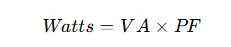
Most commercial UPS units have a PF between 0.6 and 0.9. For example, a 1000VA UPS with PF = 0.7 can only support 700W of real load. Add up the watt ratings of all connected devices (PC, monitor, switch, etc.), then leave at least a 20–30% safety margin for startup surges.
Formula for minimum recommended VA
Use this to estimate the UPS size you should buy:

Runtime: the deeper reality
Runtime depends not only on UPS rating, but also on the battery’s amp-hour (Ah) capacity.
- Typical goal: Many users only need 5–15 minutes—enough time for auto-save, graceful shutdown, or generator handoff.
- Light-load advantage: If you oversize the UPS (e.g., a 2000VA unit driving a 200W load), runtime can increase non-linearly.
- Industrial redundancy: In control cabinets, engineers often add External Battery Modules (EBMs) to customize runtime, because complex PLC systems may need more than five minutes for safe shutdown and reset procedures.
Mastering these calculations helps you avoid overload-related crashes—or overspending on capacity you’ll never truly use.
The Shift to Lithium-Ion: Comparing Battery Technologies for Modern Power Protection
The Sealed Lead-Acid (VRLA) battery has been the unchallenged monarch of the UPS world over decades. Nevertheless, with the growing energy density demands and the declining industrial footprint, Lithium-Ion (Li-ion) technology has ceased to be a luxury item and become a standard. The selection of these two chemistries is now as important as the selection of the UPS topology itself.
The Traditional Workhorse: Lead-Acid (VRLA)
VRLA batteries are still the choice of cost-effective installations. They are dependable, familiar, and the initial cost of acquisition is low. They however have physical costs that are hidden. They are cumbersome, need frequent replacement (usually after 3-5 years) and are very sensitive to temperature. Unless your server room is ideally climate-controlled, the life of a VRLA battery will be reduced by half with every 10 C increase above the recommended 25°C.
The Modern Challenger: Lithium-Ion
Li-ion batteries are the “set and forget” philosophy of modern power management. Although the initial cost may be 1.5x to 2x greater than VRLA, the benefits will be overwhelming in the long run:
- Extended Lifespan: Li-ion batteries have a life of 8-10 years- basically the lifetime of the UPS electronics. This will remove the labor expenses and logistical nightmares of mid-life battery changes.
- Higher Energy Density: They provide the same amount of power in a footprint that is 60–70% smaller and significantly lighter. For edge computing or crowded industrial control cabinets, saving space is often as valuable as the power itself.
- Temperature Resilience: Li-ion chemistry is much more “rugged.” It can operate at higher ambient temperatures without the rapid degradation seen in lead-acid, reducing the need for aggressive (and expensive) air conditioning.
The Role of the BMS
One of the characteristics of Lithium-ion UPS systems is the Battery Management System (BMS). Li-ion batteries are always monitored at the cell level in terms of voltage, temperature, and health, unlike lead-acid batteries which may fail without warning. This gives it a degree of predictive intelligence that is exactly what is required by industrial automation and smart factories, where zero-surprises is the end game.
Essential Features to Look for Beyond Battery Life

A lot of purchasers are obsessed with the duration of an outage, but that is the minimum. The actual distinction between a great UPS and a mediocre one is its smartness in protection – and its ability to fit into your power ecosystem. In addition to runtime, the following features are important:
Automatic Voltage Regulation (AVR)
The heart of the line-interactive UPS design is AVR. It automatically adjusts the moderate overvoltage/undervoltage without using battery power. AVR decreases battery cycling and can increase battery life significantly in industrial areas or in remote locations where voltage varies periodically.
Communication ports and automated shutdown software
A UPS that has USB or RS-232 is not a silent box anymore. It can send shutdown commands before the battery is emptied with management software (such as PowerChute or open-source NUT). In the case of unattended servers, or industrial controllers, this is essential to avoid corruption of filesystem and damage of databases.
Outlet layout and functional segmentation
Premium UPS models often separate outlets into zones: some provide battery backup + surge protection for core loads, while others provide surge-only protection for high-draw non-critical peripherals (like laser printers). RJ45 network surge protection can also prevent lightning-induced surges from traveling through Ethernet into your motherboard.
Remote monitoring and SNMP support
For business environments, SNMP-enabled UPS systems allow IT staff to monitor battery health, load, and temperature remotely. This visibility helps predict failures and reduces operating cost at scale.
Choosing these capabilities means you’re not just buying a “big power bank”—you’re investing in a smarter, more resilient power management layer.
Total Cost of Ownership (TCO): Evaluating the Real Value of Your Power Strategy
It is a typical error when buying a UPS to pay attention only to the Sticker Price. The purchase price in professional and industrial settings typically constitutes just 20-30 percent of the Total Cost of Ownership (TCO) of the system throughout its life. In order to make a really right decision, you have to consider the hidden costs that add up once the unit is plugged in.
The Cost of Inefficiency (The “Efficiency Tax”)
Not all UPS units use power equally. An Online Double Conversion UPS might have an efficiency of 92%, while a high-end model might reach 96% or offer an “Eco-mode” reaching 99%.
- The Math: If a 10kW UPS runs 24/7, a 4% difference in efficiency can save thousands of dollars in electricity bills over five years.
- The Heat Factor: Every watt “lost” to inefficiency is released as heat. This creates a secondary cost: your HVAC system must work harder to pump that heat out of the room.
Maintenance and Labor Costs
A cheap UPS will require more human intervention. With multiple sites, the cost of sending a technician to replace a dead battery or perform a manual re-boot can be many times the cost of the unit itself, and investing in units with hot-swappable batteries and remote management (SNMP) features will enable your staff to handle 90% of the problems on a central dashboard, reducing the cost of truck roll.
The Risk of “The Wrong Save”
The most expensive UPS is the one that fails to protect the load. In sectors like medical imaging or the industrial production lines, the cost of a single hour of downtime can reach tens of thousands of dollars.
- Standard UPS: $1,000 + $50,000 downtime event = $51,000.
- Premium UPS: $3,000 + $0 downtime = $3,000.
Lifecycle Synergy
You can save the integration tax by choosing hardware that is compatible with each other, like an Online UPS with industrial-grade switching power supplies. When the components are engineered to be compatible, they will have fewer harmonic interactions and electrical noise, and the life of each device in the cabinet will be increased.
A 5-year or 10-year window is the one to use when considering your next power protection purchase. You will also discover that the costly Online Double Conversion or Lithium-ion system is in fact the most cost-effective option to your bottom line.
Common Pitfalls When Selecting a UPS Unit
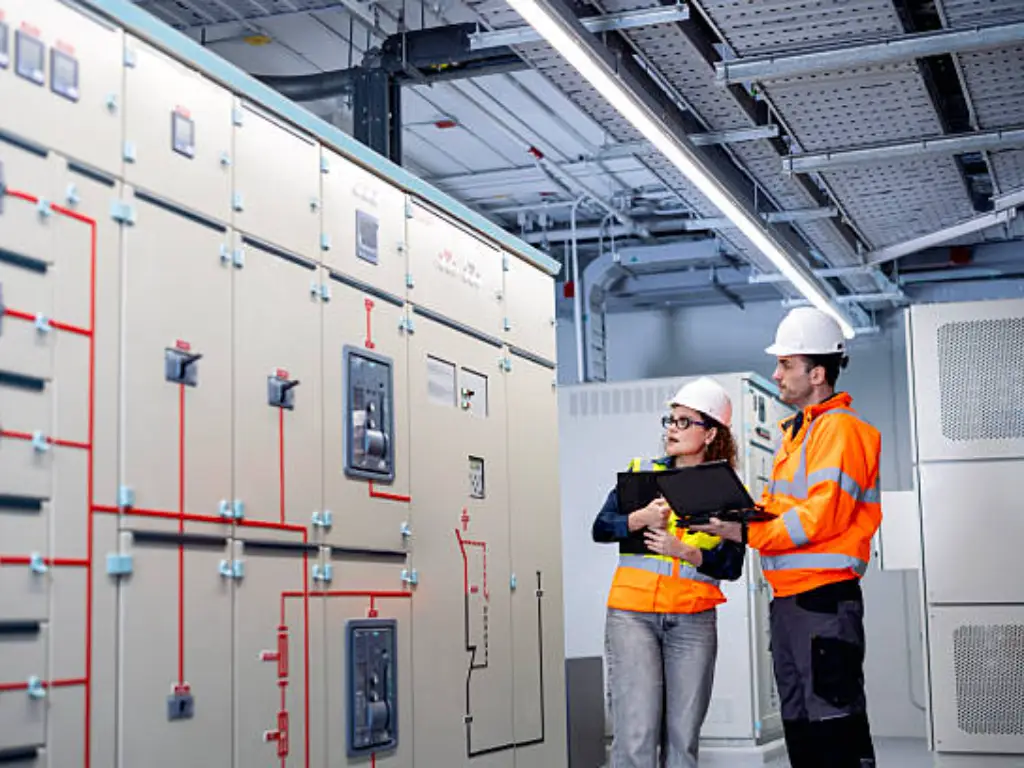
Most consumers fall into costly traps despite the fundamentals. Four of the most common mistakes that practitioners in the field make are as follows:
- Confusing VA with watts: The most widespread error. PF may be neglected, and you will be 2040% below real capacity – the UPS will overload and shut down the moment utility power is lost.
- Ignoring peak draw and inductive loads: Laser printers, tools, and motor loads can draw 3–5× their normal current on startup. Without sufficient headroom, they will trip UPS protection instantly.
- Chasing the cheapest modified sine wave option: Low-end UPS units are capable of producing buzzing, instability, or even complete incompatibility with high-end server PSUs.
- Overlooking service and spare parts: In the industrial case, especially, slow battery replacement and bad after sales services can be directly translated into downtime.
Maintenance Tips to Extend Your UPS Lifespan
The purchase of a UPS is not the end. It is how it is maintained that will make it fail in two years- or will run reliably in five and more. The following are best practices that have been tested in the industrial grade:
- Control ambient temperature: Batteries are very sensitive to temperature. The optimal working temperature is approximately 25°C (77°F). Generally, a 10 o C increase can reduce the life of sealed lead-acid batteries by half. Ventilate the unit and keep it out of the reach of heat.
- Run periodic self-tests and controlled discharge: Batteries kept at 100% charge indefinitely can become chemically sluggish. A load test or controlled discharge cycle should be done every 3-6 months to ensure that the battery is active.
- Keep it clean and dust-free: In industrial settings especially, dust can block airflow and increase the risk of electrical faults.
- Establish a battery replacement cycle: Batteries are consumables. After 3–4 years, performance typically drops sharply. Don’t wait for a failure—plan replacements proactively and use genuine parts where possible.
By maintaining it carefully, you not only increase the life of the UPS, but also your trust in the fact that the last line of defense will not break when the power becomes dangerous.
 English
  Arabic
  Turkish
  Russian
  Spanish
  French
  Indonesian
  Portuguese